3.2 COMPUTER HARDWARE
2. INPUT DEVICES
UNIT INTRODUCTION
Input devices are used to enter data or commands in a form that the computer can
use. They send the data or commands to the processing unit. According to the type of
data they input, they can be grouped into the following:
- Text input devices
- Pointing Input Devices
- Imaging input Devices
- Gaming input Devices
- Audio input Devices
- Biometric input Devices
- And Other Specialized input devices.
A. TEXT INPUT DEVICES
Text is a general word for all characters such as letters, numerical digits, symbols, and marks that combine to form words, sentences, paragraphs, and so on. Text input devices are all the devices that are used for entering text into the computer. There is a variety of devices that help us to input text into a computer.
Text input devices include:
The Keyboard,
- Voice Recognition Equipment
- OMR and Barcode readers
- OCR and Optical readers
- MICR readers
- RFID readers
- Magnetic Strip Card Readers, etc
1. THE KEYBOARD
Definition: A keyboard is an input device, consisting of a set of keys used to
operate a computer. Each press of a key corresponds to a single written character of text, but to produce
some symbols requires pressing and holding several keys simultaneously. Usually, a standard keyboard has between 80 and 110 keys. A keyboard is the main and most reliable computer input device. The QWERTY is referred to as the "Universal" keyboard.
The name "QWERTY" comes from the first six letters in the top alphabet row (the one just below the numbers). There are other setups also available such as Dvorak, ABCDE, GKOS, QWERTZ, and AZERTY Keypads, Keyers and chorded keyboards have fewer keys, specially designed for devices such as pocket-sized computers. Christopher Latham Sholes was an American newspaper publisher. In 1866, he invented the first practical typewriter and the
QWERTY keyboard layout is still in use today.
ADVANTAGES OF KEYBOARD
- Keyboards are very common (commonly supplied with computers)
- Entering data and commands with the keyboard is faster than compared to the mouse
- Keyboards are more reliable
DEMERITS OF KEYBOARD
- It takes a lot of time to practice in order to type quickly
- Keys can easily become faulty due to dust.
- Some keyboards keys are very hard to press, causing fingers to hurt.
2. VOICE RECOGNITION EQUIPMENT
Voice Recognition Equipment (Speech recognition) converts spoken words to text. Computers with Speech recognition do not actually understand speech, but they are programmed to recognize a vocabulary of words, which can range from two words to millions of words.
ADVANTAGES
- No typing of data is necessary.
- Voice recognition can be used by people whose hands are disabled.
- Dictating text is faster than typing.
- Voice Recognition systems are also ideal for the blind.
DEMERITS OF TEXT INPUT BY SPEECH RECOGNITION
- The error rate is high, depending on the user’s accent.
- Words with the same pronunciations (Homophones) like see and sea cannot be distinguished
- Speech Recognition does can’t work in a noisy environment
- The Voice Recognition software must be trained to recognize more words.
- It requires the user to speak in a writing style, i.e. even
- pronouncing the marks such as commas.
OPTICAL MARK RECOGNITION (OMR)
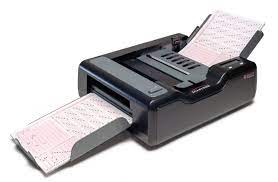 Optical mark recognition (OMR) devices read hand-drawn marks such as small circles or rectangles. A person places these marks on a form, such as a test, survey, or questionnaire answer sheet. The OMR device first reads a master document, such as an answer key sheet for a test, to record correct answers based on patterns of light; the remaining documents then are passed through the OMR device and their patterns of light are matched against the master document.
4. BARCODE READERS
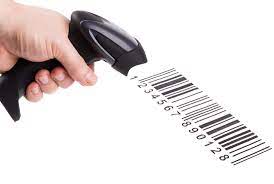 A bar code reader is an optical reader that uses laser beams to read bar codes that are printed on items
usually in supermarkets. A bar code is an identification code that normally consists of a set of vertical lines
and spaces of different widths. The bar code represents some data that identifies the item and the manufacturer.
5. OPTICAL CHARACTER RECOGNITION (OCR)
Optical character recognition (OCR) is a technology that involves reading typewritten, computer-printed, or handwritten characters from ordinary documents and translating the images into a form that the computer can
understand. OCR devices include a small optical scanner for reading characters and sophisticated software (OCR software) for analyzing what is read.
6. MICR READERS
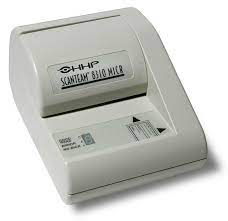 Magnetic-ink character recognition (MICR) reader is used to read text printed with magnetized ink.
MICR readers are mainly used by the banking industry for processing checks. Each check is inserted into a MICR reader, which sends the check information to a computer for processing.