EXPLORING ACCESS
1. WORKING WITH ACCESS
1.5. USING THE QUICK ACCESS TOOLBAR
By default, the Save, Undo, and Repeat/Redo buttons appear on the Quick Access Toolbar. If you regularly use a few buttons that are scattered on various tabs of the Ribbon and you do not want to switch between tabs to access the buttons or crowd the Ribbon with a custom tab, you might want to add these frequently used buttons to the Quick Access Toolbar. They are then always visible in the upper-left corner of the program window.
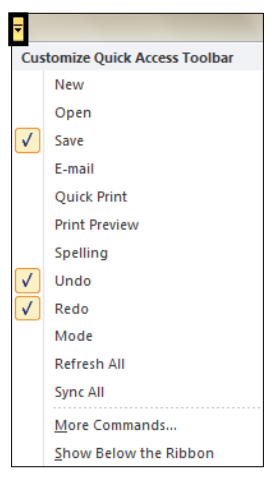
Clicking the Customize Quick Access Toolbar button at the right end of the
Quick Access Toolbar displays a menu that lists commonly used commands.
Check marks appear to the left of commands currently available on the Quick
Access Toolbar. You can click these commands to remove them and click other
commands to add them.
As you add buttons to the Quick Access Toolbar, it expands to accommodate
them. If you add too many buttons, some of them might not be visible, which
defeats the purpose of adding them. To resolve this problem, you can move the
Quick Access Toolbar below the ribbon by clicking the Customize Quick
Access Toolbar button, and then clicking Show below the Ribbon.