COMPUTER BASIC SKILLS
Section outline
-
Dear Student welcome to the Computer Studies course
Course Unit: Basic Computer Skills
Name of Lecturer: Owoyesigire Urbans Mujuni
Email: mujuniurbans@gmail.com
Tel: +256771449642
This Course Introduces students to Introduction to Computers, Basic Skills of operating a computer, Typing and formatting word documents
Requirements
- A smartphone
- Active Email
- Active WhatsApp Number
- No specific academic qualification is required. Fluent knowledge of the English language
- A laptop computer for practical and simulation if you can afford
Method of Assessment
Assessment will be in terms of tests, coursework, and practical exercises (40%) and final examination (60%).
Method of Delivery:
This course will be delivered primarily through the lecture method complemented by students’ group discussions. In addition, blended learning and case studies will be used to enhance the student's analytical and communication skills.
In this course, we shall cover the following Modules;
1. Introduction to Computer Studies
2. Computer Care and Safety
3. Computer Hard Ware
4. Computer Software
5. MS Word Processing
6. MS PowerPoint
7. MS Excel
Specific objectives for this course
- To impart knowledge on basic computer concepts such as Ms word, Excel, PowerPoint and Databases, Electronic mail and other simple technology tools used every day
- To equip learners with basic IT skills useful for offline and remote activities. To familiarize them with the probable tools used and the guides towards effective usage of such tools
- To train learners with how to start a computer, shut it down, and other essential methods involved in the process.
- To produce competent, committed, knowledgeable and skilled Teachers equipped with the basic IT skills that can serve as a beginner knowledge towards the acquisition of remote jobs and assist in their Teaching and learning
- To prepare Learners for the next level of the Technology revolution
-
Dear students,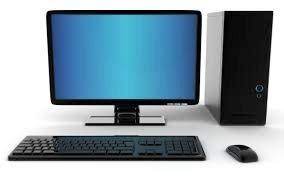
Welcome to module 1, this module is about Introduction to Computers it is good practice to understand the general computer concepts
under this module we shall cover two Units;
Unit1 COMPUTERS TODAY
Unit 2 USES AND FUNCTIONS OF COMPUTERS-
Students mustMark as done
Click on the link above (click on the word FORUM in orange color) to join the Forum
Dear students, this Forum is for Self Introduction, please Introduce yourself to the rest
of the members here. Follow this criterion to introduce your self and its mandatory to post on the forum
1. Your Full Names
2. Your favorite food
3. Your nickname
3. your Expectation(s) from this course
4. If you were to be an animal which animal would you be
NB
RULES OF ENGAGEMENT
1. DO NOT USE FOUL WORDS NOR INSULT ANY PARTICIPANTS. ALWAYS BE POLITE AND RESPECTFULNESS
2. DO NOT SHARE VIOLENT GRAPHICS, IMAGES OR PORNOGRAPHIC MATERIALS.
3. RESPECT THE VIEWS OF OTHERS WITHOUT FIGHT NOR GRUDGE.
4. THIS PLATFORM IS FOR ACADEMIC DISCUSSIONS ONLY, DO NOT PROMOTE BUSINESS, OR
INVOLVE IN POLITICS TALKS ETC.
-
Students mustMark as doneClick on the click above to access the announcements
-
Students mustMark as doneClick the link above to access the course Outline and the Course Objectives
-
Students mustMark as done
Click on the link above to access Reading Materials on "Introduction to Computers"
This Module will expose you to Terminologies and basic concepts of a computer and why we do computer studies as a subject.? This module has two units
- Computers Today
- Functions and Uses of computers
-
Opened: Saturday, 24 September 2022, 12:00 AMDue: Tuesday, 4 October 2022, 12:00 AMStudents mustMark as done
-
Students mustMark as done
Click on the link above to join the online discussion or Peer to Peer discussions in this course
NOTE: Participation is mandatory for all learners and you are expected to comply with all the rules of engagement
-
Students mustMark as done
hhhhjj kinh listen
-
-
-
Students mustMark as doneclick on the link above to download these notes550.5 KB
-
Students mustMark as done
click on the link above to download these notes
45.2 KB
-
-
This will be deleted soon
-
-
 Computer care and safety involve rules, measures, and guidelines regarding the proper use of computers. Computers, like any other piece of electronic equipment, need special care and attention in order to perform properly and safely. There are many tasks that should be done, and caution should be taken to ensure proper working, and safety of all components of the computer system.
In this unit, we shall concentrate on some daily do's and don'ts and precautions that anyone in a computer laboratory can do.
A computer laboratory is a building where computers are set up for safe use.
Under this Module, we shall cover the following Four units Namely;
- The Computer Laboratory Rules and Regulations.
- Management of Computers and their Environments
- Maintenance of Computers
- The Ethics and Integrity In Computer Use
-
Students mustMark as done
Module 2: Introduction
Dear Student, kindly listen to this podcast to understand what we shall go through in this Module
Please listen to this podcast below
-
Due: Saturday, 1 October 2022, 12:44 PMStudents mustMark as done
Click on the link above (Discussion Forum in orange color) to join the Forum
NOTE RULES OF ENGAGEMENT
1. DO NOT USE FOUL WORDS NOR INSULT ANY PARTICIPANTS. ALWAYS BE POLITE AND RESPECTFULNESS
2. DO NOT SHARE VIOLENT GRAPHICS, IMAGES OR PORNOGRAPHIC MATERIALS.
3. RESPECT THE VIEWS OF OTHERS WITHOUT FIGHT NOR GRUDGE.
4. THIS PLATFORM IS FOR ACADEMIC DISCUSSIONS ONLY, DO NOT PROMOTE BUSINESS, OR
INVOLVE IN POLITICS TALKS ETC.
-
Students mustMark as done
Click on the link above to access the notes provided on Computer Care and Safety
Dear student Under this Module we shall cover the following Topics;
- The Computer Laboratory Rules and Regulations.
- Management of Computers and their Environments
- Maintenance of Computers in Good Working Conditions.
- The Ethics and Integrity In Computer Use
-
Students mustMark as done
Click on the link above to download this learning resource its is a PDF document
559.8 KB -
Opened: Sunday, 2 October 2022, 12:00 AMDue: Monday, 3 October 2022, 12:00 AMStudents mustMark as done
-
-
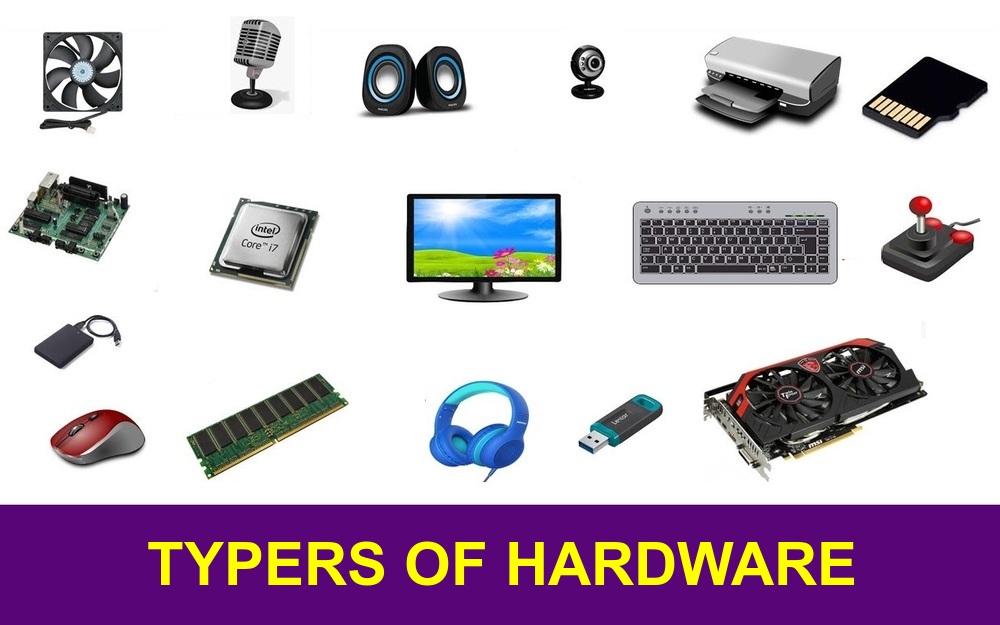 Under this module, we shall be introduced to Computer hardware which refers to all the tangible components of the computer
system. Every time, new devices are invented and used for different purposes.
Computer hardware equals the collection of physical elements that comprise a
computer system. Computer hardware refers to the physical parts or components of a
computer such as a monitor, keyboard, hard drive disk, mouse, printer, graphic card,
sound card, memory, motherboard, chips, etc. all of which are physical objects
that you can actually touch.
Under this module, we shall be introduced to Computer hardware which refers to all the tangible components of the computer
system. Every time, new devices are invented and used for different purposes.
Computer hardware equals the collection of physical elements that comprise a
computer system. Computer hardware refers to the physical parts or components of a
computer such as a monitor, keyboard, hard drive disk, mouse, printer, graphic card,
sound card, memory, motherboard, chips, etc. all of which are physical objects
that you can actually touch.The module has four units Namely;
- Input devices
- Output devices
- Storage devices and
- Processing devices
-
Students mustMark as done
Module 3: Introduction
Dear Students welcome to Module 3, kindly listen to this podcast to understand what we shall go through under this Module.
kindly listen to the podcast below
-
Students mustMark as done
lick on the link above (Discussion Forum in orange color) to join the Forum
NOTE RULES OF ENGAGEMENT
1. DO NOT USE FOUL WORDS NOR INSULT ANY PARTICIPANTS. ALWAYS BE POLITE AND RESPECTFULNESS
2. DO NOT SHARE VIOLENT GRAPHICS, IMAGES OR PORNOGRAPHIC MATERIALS.
3. RESPECT THE VIEWS OF OTHERS WITHOUT FIGHT NOR GRUDGE.
4. THIS PLATFORM IS FOR ACADEMIC DISCUSSIONS ONLY, DO NOT PROMOTE BUSINESS, OR
INVOLVE IN POLITICS TALKS ETC.
-
Students mustMark as doneClick on the link above to access this material, this module covers the following units;
- INPUT DEVICES
- OUTPUT DEVICES
- STORAGE DEVICES
- PROCESSING DEVICES
-
Students mustMark as done
This is a PowerPoint file it has content about Computer Hardware please kindly download it and read through, it has areas which are examinable
1.2 MB · Uploaded 24/09/22, 13:44 -
Opened: Sunday, 25 September 2022, 12:00 AMDue: Monday, 17 October 2022, 12:00 AMStudents mustMark as done
-
Opened: Friday, 7 October 2022, 9:35 PMClosed: Friday, 7 October 2022, 10:05 PMStudents mustMark as doneDear students our Test will be available on 6th/10/2022 at 4: 30 PM, This will be our first online TEST
This quiz has a time limit of 35 Mins and you are allowed to do it once if you don't submit it in 35 Mins the system will submit it for you and you will be scored depending on the questions you have attempted. make sure that you have a good Internet connection on that day to avoid interruptions
I wish you good luck -
Opened: Saturday, 1 October 2022, 12:00 AMDue: Saturday, 8 October 2022, 12:00 AMStudents mustMark as done
-
 By the end of this unit you should be able to:
- Define and describe the types/classifications of software: (definitions with examples) Application & System Software
- Describe the characteristics of computer software
- system software and
- Application software
-
Students mustMark as donelick on the link above (Discussion Forum in orange color) to join the Forum
NOTE RULES OF ENGAGEMENT -
-
Students mustMark as doneClick on the above link to access this reading material. This module covers two units
- System software
- Application software
-
-
Opened: Monday, 10 October 2022, 4:00 PMClosed: Monday, 10 October 2022, 4:15 PMStudents mustMark as done
Dear Students,
This Quiz is for the End of Module 4
-

Overview In this course, you will learn how to create a Folder on the Desktop, how to use Word to create and edit simple documents; format documents; add tables and lists; add design elements and layout options; and proof documents.
-
Students mustMark as done
Watch the video below it is about Desktop and how to create a Folder on the Desktop
-
Opened: Sunday, 2 October 2022, 12:00 AMDue: Wednesday, 12 October 2022, 12:00 AMStudents mustMark as done
-
Students mustMark as doneIntroduction to MS Word
watch the Video below it is about Introduction to Microsoft Word -
Opened: Monday, 3 October 2022, 12:00 AMDue: Monday, 10 October 2022, 12:00 AMStudents mustMark as done
-
-

Having the skills to operate and get the most from a spreadsheet application directly enhances your ability to manage numerical data and will positively impact your job performance. This MS-Excel/ Spreadsheets Module provides you with the tools to understand the concept of spreadsheets, and to demonstrate an ability to use a spreadsheet to produce accurate work outputs.
On completion of this Module you will be able to:
- Work with spreadsheets and save them in different file formats.
- Choose built-in options, such as the Help function, within the application to enhance productivity.
- Enter data into cells; use good practice in creating lists.
- Select, sort, copy, move and delete data.
- Edit rows and columns in a worksheet.
- Copy, move, delete, and appropriately rename worksheets.
- Create mathematical and logical formulas using standard spreadsheet functions; use good practice in formula creation; recognize error values in formulas.
- Format numbers and text content in a spreadsheet.
- Choose, create, and format charts to communicate information meaningfully.
- Adjust spreadsheet page settings.
- Check and correct spreadsheet content before finally printing spreadsheets.
What are the benefits of this module?
This module gives you the skills to operate spreadsheet software, including the most common commercial and open-source offerings. Spreadsheets maintain an important role in business operations and having the knowledge to utilize their functions, formulas, and features is a necessary requirement for any worker. Once you have developed the skills and knowledge set out in this Module, you will be in a position to become certified in
Spreadsheets.
-
Students mustMark as done
CHAPTER ONE- EXPLORING MICROSOFT EXCEL 2016
In this Chapter, you will learn about:
- Starting Excel
- The user interface
- Excel options
- Creating a workbook
- Opening a workbook
- Saving a new workbook
- Closing a workbook
- Working with worksheets
- Using the ribbon
- Hiding the ribbon
- Using magnification/zoom tools
- Exiting Excel
-
-
 The ability to create
and deliver an engaging presentation is a vital component of your work, particularly if you
are expected
to communicate information and ideas to others. With Presentation, you will
learn
how to comfortably
utilize presentation software and will be provided with the tools to develop
your presentation
skills
The ability to create
and deliver an engaging presentation is a vital component of your work, particularly if you
are expected
to communicate information and ideas to others. With Presentation, you will
learn
how to comfortably
utilize presentation software and will be provided with the tools to develop
your presentation
skillsOn completion of this module you will be able to:
- Work with presentations and save them in different file formats.
- Choose built-in options, such as the Help function, within the application to enhance productivity.
- Understand different presentation views and when to use them; choose different slide layouts and designs.
- Enter, edit, and format text in presentations.
- Recognize good practice in applying unique titles to slides.
- Choose, create, and format charts to communicate information meaningfully.
- Insert and edit pictures, images, and drawn objects.
- Apply animation and transition effects to presentations.
- Check and correct presentation content before finally printing and giving presentations.
-
Students mustMark as done
What are the benefits of completing this module?
The ability to create and present engaging presentations is a vital skill for professionals, allowing you to provide information, data, and media in a variety of ways to truly express your ideas and your work. With Presentation, you will learn how to effectively display a range of different information. Once you have developed the skills and knowledge set out in this Module, you will be in a position to become certified in Presentation
-
Students mustMark as done
CHAPTER ONE- EXPLORING POWERPOINT
In this Chapter, you will learn how to:
- Work with PowerPoint
- Start PowerPoint
- Use the Quick Access Toolbar
- Use PowerPoint Help
- Exit PowerPoint
-
-
 Databases are crucial tools for storing, managing and manipulating data. Using
Databases will help you understand what a database is and what it is used for. This module
will also allow you to demonstrate a range of key skills relating to building and using a
database.
Databases are crucial tools for storing, managing and manipulating data. Using
Databases will help you understand what a database is and what it is used for. This module
will also allow you to demonstrate a range of key skills relating to building and using a
database.On completion of this module you will be able to:
- Understand what a database is and how it is organized and operated.
- Create a simple database and view the database content in various modes.
- Create a table; define and modify fields and their properties; enter and edit data in a table.
- Sort and filter a table or form; create, modify and run queries to retrieve specific information from a database.
- Understand what a form is; create a form to enter, modify, and delete records and data in records.
- Create routine reports and prepare outputs ready for distribution.
What are the benefits of this module?
This module covers the key functions and characteristics of databases and how to organize and operate them. Once you have developed the skills and knowledge set out in this module, you will be in a position to become certified in Databases.
-
Students mustMark as done
CHAPTER ONE– EXPLORING ACCESS
In this Chapter, you will learn how to:
- Work with Access
- Start Access
- Open an existing database
- Familiarise with the Ribbon
- Use the contextual tabs
- Use the Quick Access Toolbar
- Understand database objects
- Use the Navigation Pane
- Open a database object
- Delete a database object
- Use tabbed documents
- Close a tabbed document
- Close all tabbed documents
- Switch between the view modes
- Use the Options dialog box
- Close a database
- Create a new database
- Use Help
- Exit Access
-