1.4 INTRODUCTION TO COMPUTERS
Click on the link above to access Reading Materials on "Introduction to Computers"
This Module will expose you to Terminologies and basic concepts of a computer and why we do computer studies as a subject.? This module has two units
- Computers Today
- Functions and Uses of computers
2. UNIT TWO: USES AND FUNCTIONS OF COMPUTERS
UNIT INTRODUCTION
Computers have always assisted to solve the problems faced by mankind. Although the word ‘computer’ means ‘something which adds, counts, estimates or calculates’, a computer today is not merely a “calculator”. Computers perform a vast variety of jobs with tremendous speed and efficiency. Today people use computers in almost every walk of life. However, along with these advancements in science there arises the dilemma of the development of technology as it affects human individuals. They have come with both positive and negative impacts on our society.
Computers are applied in the areas of;
- Education
- Research
- Business
- Health
- Communication
- Military/security
- Home
- Entertainment / Leisure
- Astronomy and
- Transport
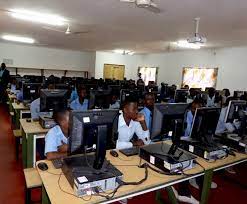 a. In teaching, we use Computer Assisted Instruction (CAI) by use of Interactive
whiteboards, and projectors, in class.
b. Computer Aided Learning (CAL) gives access to On-screen learning materials.
Students learn at their own pace and can repeat a lesson they didn’t understand.
c. Computer Aided Assessment (CAA) helps teachers to reduce the time and
labor to mark students’ books and answer scripts.
d. Error-free School Timetables can be generated using special timetable computer
software.
e. With Use of School Administration and Management Systems. (SAMS) Records
management is made easier because all details of learners can be held on
a computer, and easily retrieved, reducing administrative costs.
f. Students’ Progressive Report Cards can be produced electronically by use of
computers instead of handwritten ones.
g. Distance learning through computer-based training. People get awards such as
degrees without going to class.
h. Teachers use simulation software to perform difficult or dangerous experiments in class.
i. Use of special facilities for students with disabilities like text-to-speech and speech
recognition to help blind students.
j. Interactive Multimedia packages on DVDs can clearly demonstrate and explain
abstract concepts.
k. Schools use computers to create school websites for sharing information with the
public.
l. Productivity tools like desktop publishing and presentation software are used in
projects and other school activities.
m. Computers are used for calculating mathematical arithmetic by students and
teachers in class.
n. Digital computers are also used for telling and managing time in schools.