STARTING EXCEL 2016
1. STARTING EXCEL 2013
1.6. USING THE RIBBON
The Ribbon is designed to help you quickly find the commands that you need to complete a task. Commands are organized in logical groups, which are collected together under tabs. Each tab relates to a type of activity, such as writing or laying out a page. To reduce clutter, some tabs are shown only when needed. For example, the Picture Tools tab is shown only when a picture is selected.
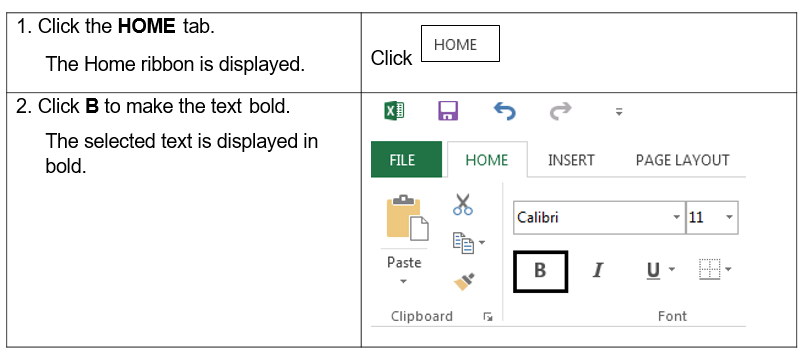
Steps
Using the ribbon to make the text
bold
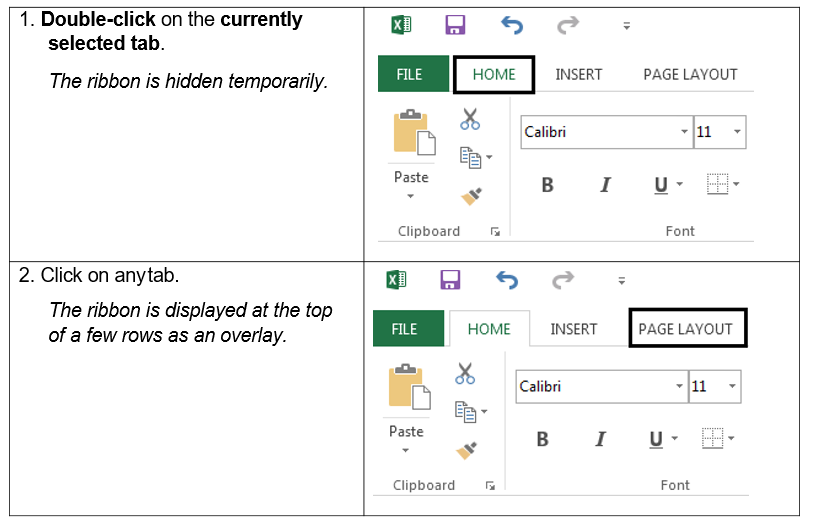
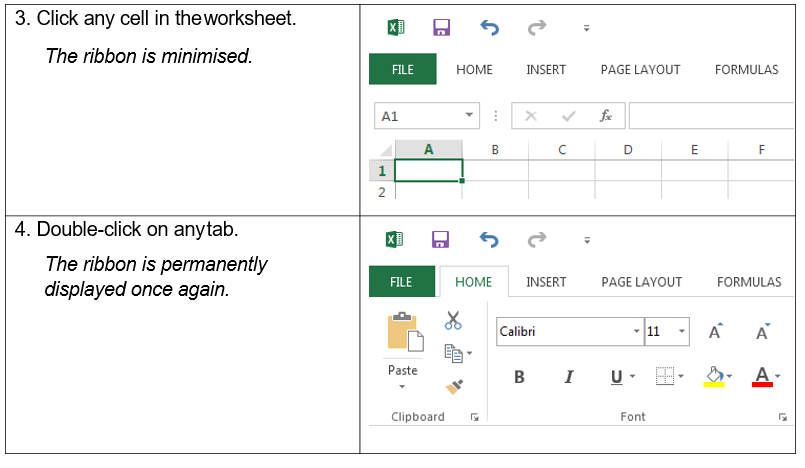
HIDING THE RIBBON
You can’t delete or replace the
Ribbon with the toolbars and menus from the earlier
versions of Microsoft Office, although
you
can
minimize
it to allow
for more on-screen
space. When
this option
is in use, the
ribbon
reappears when you click on a tab, then disappears after
you
select
a command or when
you
click anywhere in the
worksheet